Heading

How to make dropping off your Vinted parcels quicker and easier
Selling on Vinted offers you a quick and easy way to make some extra money. But dropping off parcels at different places depending on the courier selected for posting items can take up valuable selling time. Well, we can help with that. And all it takes is a quick settings change.
Drop off all your Vinted parcels in one place
Imagine the difference sending all your Vinted parcels from one place could make:
-
No more checking where to go for each parcel
-
No more trips to different drop-off locations
-
More time to spend listing and selling your items
With a simple settings change you can do just that. Send everything you sell on Vinted from a local Post Office branch that offers posting services from multiple couriers.
Here’s how to set it up.
- Find a branch with Royal Mail, DPD and Evri services
First, find a Post Office branch in your area that offers services from the couriers you plan to use. Every branch offers Royal Mail services. But to find nearby branches with DPD or Evri services, you’ll need to use our branch finder.
Follow these steps:
-
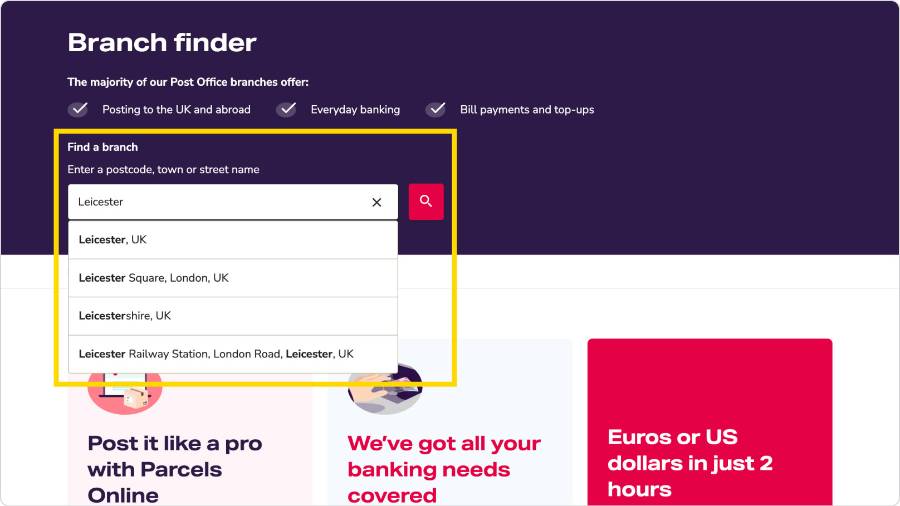
Enter a postcode, town or street name in the search box
-
Select a location from the list then the magnifying glass button to search
-
Under “Do you need a specific service?” select ‘Filter services’
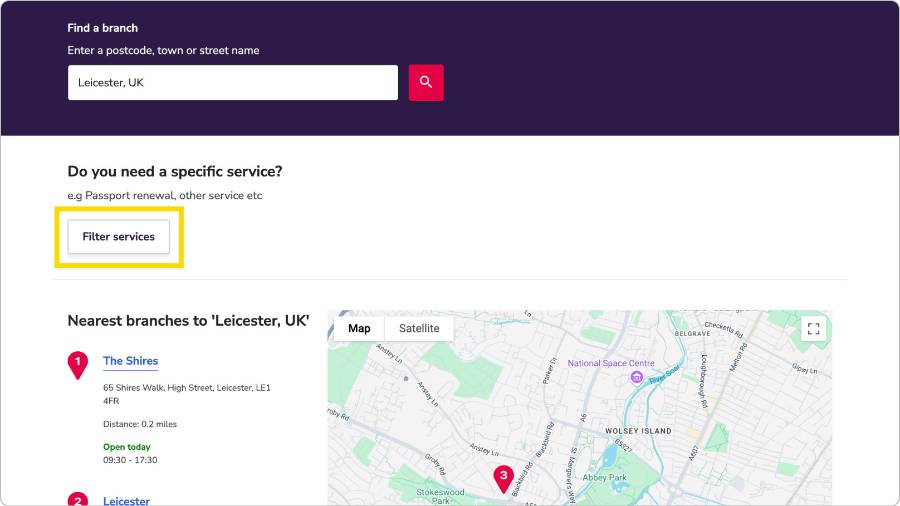
4. Select the ‘Mails’ option from the list that appears
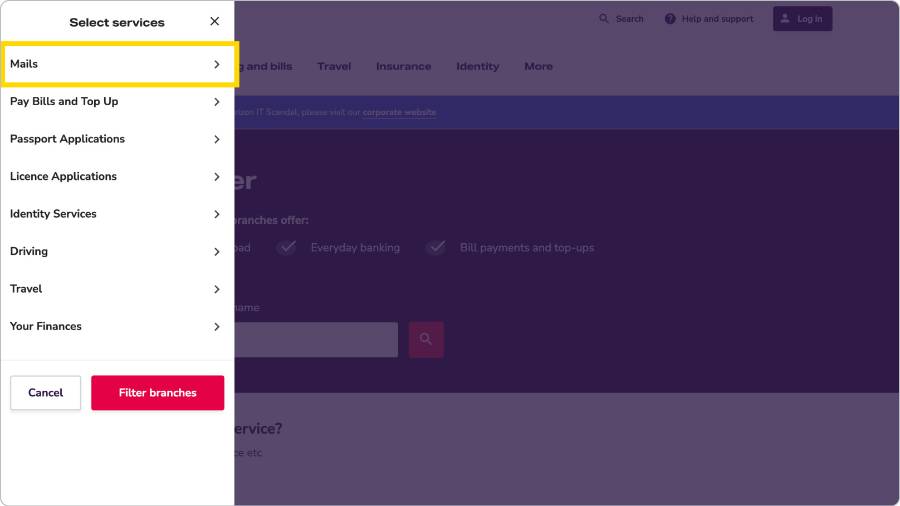
5. Select ‘DPD – drop off and collections’ and/or ‘Evri – drop off and collections’ as needed. Here, we’ve selected them all.
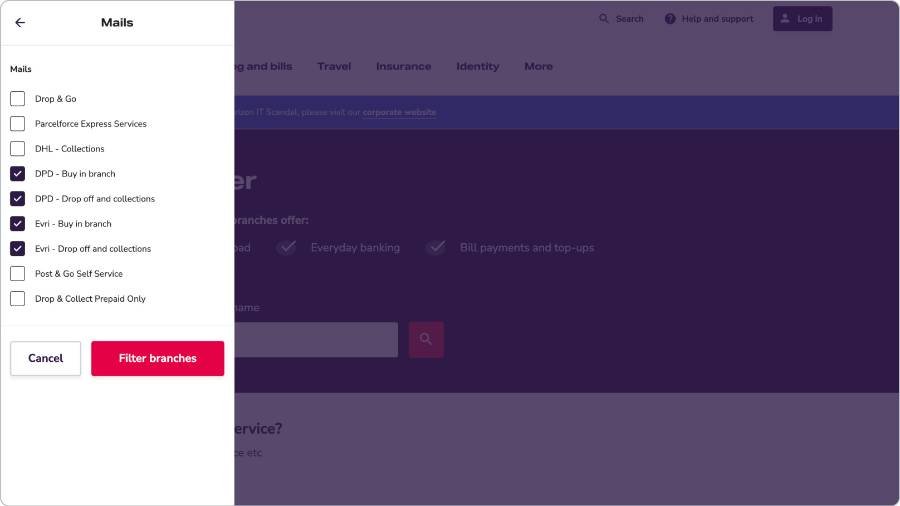
6. Select the ‘Filter branches’ button
This will show you which branches in the area you searched offer drop-off with the couriers you selected.
2. Update your Vinted settings
Once you know which couriers your Post Office branch accepts, follow these steps:
-
Open the Vinted app and go to ‘Settings’
-
Tap ‘Shipping options’
-
Turn on the couriers that your Post Office branch takes
-
Turn off any couriers that would mean dropping off somewhere else
Now, when you sell something, buyers will only see the shipping options you’ve chosen.
Key takeaway
A simple change to your Vinted settings can help make selling easier and save you time. Check which couriers your local Post Office branch accepts and update your settings today.
Find nearby branches with the courier services you need
How to make dropping off your Vinted parcels quicker and easier
Selling on Vinted offers you a quick and easy way to make some extra money. But dropping off parcels at different places depending on the courier selected for posting items can take up valuable selling time. Well, we can help with that. And all it takes is a quick settings change.
Drop off all your Vinted parcels in one place
Imagine the difference sending all your Vinted parcels from one place could make:
-
No more checking where to go for each parcel
-
No more trips to different drop-off locations
-
More time to spend listing and selling your items
With a simple settings change you can do just that. Send everything you sell on Vinted from a local Post Office branch that offers posting services from multiple couriers.
Here’s how to set it up.
- Find a branch with Royal Mail, DPD and Evri services
First, find a Post Office branch in your area that offers services from the couriers you plan to use. Every branch offers Royal Mail services. But to find nearby branches with DPD or Evri services, you’ll need to use our branch finder.
Follow these steps:
-
Enter a postcode, town or street name in the search box
-
Select a location from the list then the magnifying glass button to search
-
Under “Do you need a specific service?” select ‘Filter services’
- Select the ‘Mails’ option from the list that appears
- Select ‘DPD - drop off and collections’ and or ‘Evri - drop off and collections’ as needed. Here, we’ve selected them all.
2. Update your Vinted settings
Once you know which couriers your Post Office branch accepts, follow these steps:
- Open the Vinted app and go to ‘Settings’
- Tap ‘Shipping options’
- Turn on the couriers that your Post Office branch takes
- Turn off any couriers that would mean dropping off somewhere else
Key takeaway
A simple change to your Vinted settings can help make selling easier and save you time. Check which couriers your local Post Office branch accepts and update your settings today.
Common questions
-
The couriers available depend on the branch. All Post Office branches around the UK accept Royal Mail items. You can also send with either or both DPD and Evri in a growing number of branches. Some offer both, and some offer one or the other. Check using our branch finder before setting your postage options in Vinted.
-
Yes. Just make sure in the Vinted app your courier sending options match those available in your preferred Post Office branch. That way, you can send everything you sell on the platform from that one branch, all in one go.
-
Go to ‘Settings’ in the Vinted app, tap ‘Shipping options’ and turn on the couriers that match the services offered at your preferred Post Office branch. Turn off any that require drop-offs elsewhere.
-
Vinted only shows drop-off locations for the couriers you’ve selected. If your nearest Post Office branch doesn’t appear, check which couriers they accept and update your Vinted shipping options settings to match.
Select ‘DPD - drop off and collections’ and or ‘Evri - drop off and collections’ as needed. Here, we’ve selected them all.
Sending and banking services
-
Drop & Go
Sending items often? Save time and easily keep track of what you send with our fast drop-off mails service. It’s free to sign up
-
Parcels Online
Compare services and prices from different carriers. Pay for postage online. Then drop parcels off at any participating Post Office branch
-
Everyday banking
Access your bank account at thousands of Post Office branches. Pay in cash and cheques, make withdrawals or check your balance
More about posting

Do I need to pay tax on online earnings? UK tax rules for selling online
Selling online is easier than ever. But do you need to pay tax on what you earn? This guide explains when tax applies, what types there are and how to stay on the right side of HMRC rules.

5 tips to grow your online business and be more productive
Work smarter not harder as you grow your online seller business with these tips from confidence coach and Drop & Go user Tiwalola Ogunlesi.

8 ways to declutter your home and make extra cash
Thinking about decluttering your home? As well as helping create a calmer space, clearing out your unwanted things could even put some extra money in your pocket.

A clear returns policy: tips every online seller should know
When you run your own online store, your products could end up in homes all over the UK, even around the world. But there’s one thing all sellers must face eventually: dealing with returns. And we can help with that.

How to sell your kids’ used items successfully
If you’re a parent looking to make a bit of extra money or even just declutter your home, selling your kids’ old clothes and preloved items can be a great way to do it.

Why parcel tracking matters when you’re selling online
Providing parcel tracking details helps keep your customers happy, your reputation shining and your profits growing. It shows buyers where their item is and helps prevent complaints or delays. And we can help with that.

Save time with this easy Vinted drop-off hack
Tired of dropping off parcels in different places? This simple hack lets you send all your Vinted parcels from one Post Office branch, saving you time and hassle.

Online seller stories: Manuela, founder of Whirlylicious
Manuela, founder of Whirlylicious, sells colourful candy floss cakes and treats online and sends them all over the UK.

How to sell your preloved items on Vinted
Want to make a little extra money, clear some space in your wardrobe or a bit of both? Enter Vinted, the online marketplace for buying and selling preloved clothes.

How to post your items internationally
Sending letters or parcels abroad? Whether it’s a birthday gift, business letter or parcels of different sizes you’re posting to customers, we can help with that.

Selling your homemade creations online and locally
Whether you’re into making candles, greetings cards or customised gifts, turning your hobby into a side hustle has never been easier. And we're here to help you get started.

How to sell on eBay
Are you wondering how to make some extra money on the side? Or perhaps you’re thinking of changing your career path? One area to consider is online selling.

How to sell on Amazon UK Marketplace
Have you ever dreamt of quitting the 9 to 5 for a more relaxed way of working? One route to a better work-life balance may be selling online.

How to get started selling online
Learn how to start selling online and make extra money. This guide covers how to set goals, pick the right platform and make sure what you sell reaches customers safely. Plus, a quick, easy, reliable service that can help with that.

Online seller stories: Bob and Julie, founders of Corby Kilns
Bob and Julie, the husband-and-wife duo behind Corby Kilns, have been at the heart of the UK’s pottery community for almost three decades.

What is SEO? Getting your small business found online
Promoting your business online is one of the best ways to attract new customers. But knowing where to start can be confusing.

Growing your business beyond online marketplaces
You’ve proved your products sell on eBay, Amazon Marketplace or Vinted. Now you’re thinking bigger: steadier sales, better profits and more control.

Returning online shopping: what every online shopper should know
Shopping online is quick and simple. Returning items shouldn’t feel any different. If you’ve bought something that doesn’t fit, wasn’t what you expected or you ordered more than you planned to keep, this guide helps you understand your rights and how to return items with confidence.

Why your packaging matters when you sell online
The right packaging protects your products, builds customer trust and can save your business money. And we can help with that. Read our guide to help get it right for you and your shoppers.
Changes to USA customs requirements for imported goods
From 29 August 2025, new rules apply to goods sent to the USA. Among the changes, items valued at $800 or less are no longer exempt from import duties and taxes.

Online seller stories: Jade, founder of Smell-A-Licious
Meet Jade, the creative force behind Smell-A-Licious, the handmade wax melt brand that’s designed to fill your home with happiness.

How to keep your parcel deliveries safe
Online shopping’s become one of the easiest and most popular ways to buy goods in the UK. Making sure your orders reach you safely and securely is more important than ever.

Choosing the right courier for your needs
Whether you’re fulfilling regular orders or only sending items now and then, you’ll want to know you’re getting the right postage service at the right price. We can help with that.

The ultimate side hustle guide
Want to earn extra money or build a new career? Starting a side hustle could be your answer.

Master the art of seasonal selling
Ever wonder why some online sellers do so well at certain times? They've mastered the art of seasonal selling. For businesses and side hustlers who’ve got the knack, it can mean big spikes in sales.

Drive your success and make the most of the Christmas rush – without the stress
Our partners Evri are sharing tips to save you time, increase your orders and help your business run smoothly into the festive season. Ready to start crossing off your wishlist?

How to start a subscription box business
Whether it’s a side hustle or a full-time job, starting a subscription box business can be a great way to unleash your creativity and help you make money too.

How to sell on TikTok Shop
TikTok is one of the fastest-growing platforms for small businesses and creative sellers. Whether you make jewellery, art prints or sell vintage finds, TikTok can help you reach real customers with no set up or product listing fees.
Vinted is a trademark of its respective owner. Post Office Limited has no affiliation with, and is not endorsed by, Vinted.